
How TopVault keeps your photos private
The TopVault website and mobile app allow you to upload photos of collectibles. These photos remain private to the collector and are not visible to either TopVault nor other collectors. For example, if you upload a photo for one of your collectibles and then share a link to that collectible, or share a link to your entire collection, they will never see that photo.
This is because privacy-by-default is present throughout all TopVault features. In the case of photo uploads, the inability to share photos with other collectors may be an inconvenience, yet it is not possible to disable this privacy feature.
Uploads remain encrypted when sychronized
The main privacy-preserving component for photo uploads is that photos remain encrypted to you when they are synchronized between your devices. The TopVault server, or backend, cannot decrypt these photos so there is no way of accidental exposure. How this works is covered later in detail.
The photo synchronization is not entirely automatic, and is not even needed if you only use a single device. When you log into a new device for the first time TopVault will recognize that device as "new for you". A new device may include using a web browser for the first time, using a new mobile device, or using a private tab.

You will notice a small notification on your profile picture saying the new device does not have upload "keys". A key from any of your previous devices is needed to view and upload your photos. Clicking the notification symbol will show the explainer:
Photo upload keys have not been synchronized yet. Please refresh this page on your existing device to synchronize photo upload keys. Learn more about photo uploads here.
Refreshing your profile on a previous device is all that is needed to complete sychronization. Or you can use the "Sync upload keys" button in your profile. Clicking this button is helpful if keys are not synchronizing even after refreshing your profile.
How end-to-end encrypted photos work
The TopVault application implements a lightweight version of end-to-end encryption for user photos through a key ledger. This is designed to protect against accidental exposure of collector photos. This is a stronger protection compared to strict auditing in code to make sure photos are not made available through sharing features. This also adds assurance that TopVault developers (like me!) cannot view uploaded photos.
Consider the sequence diagram here:
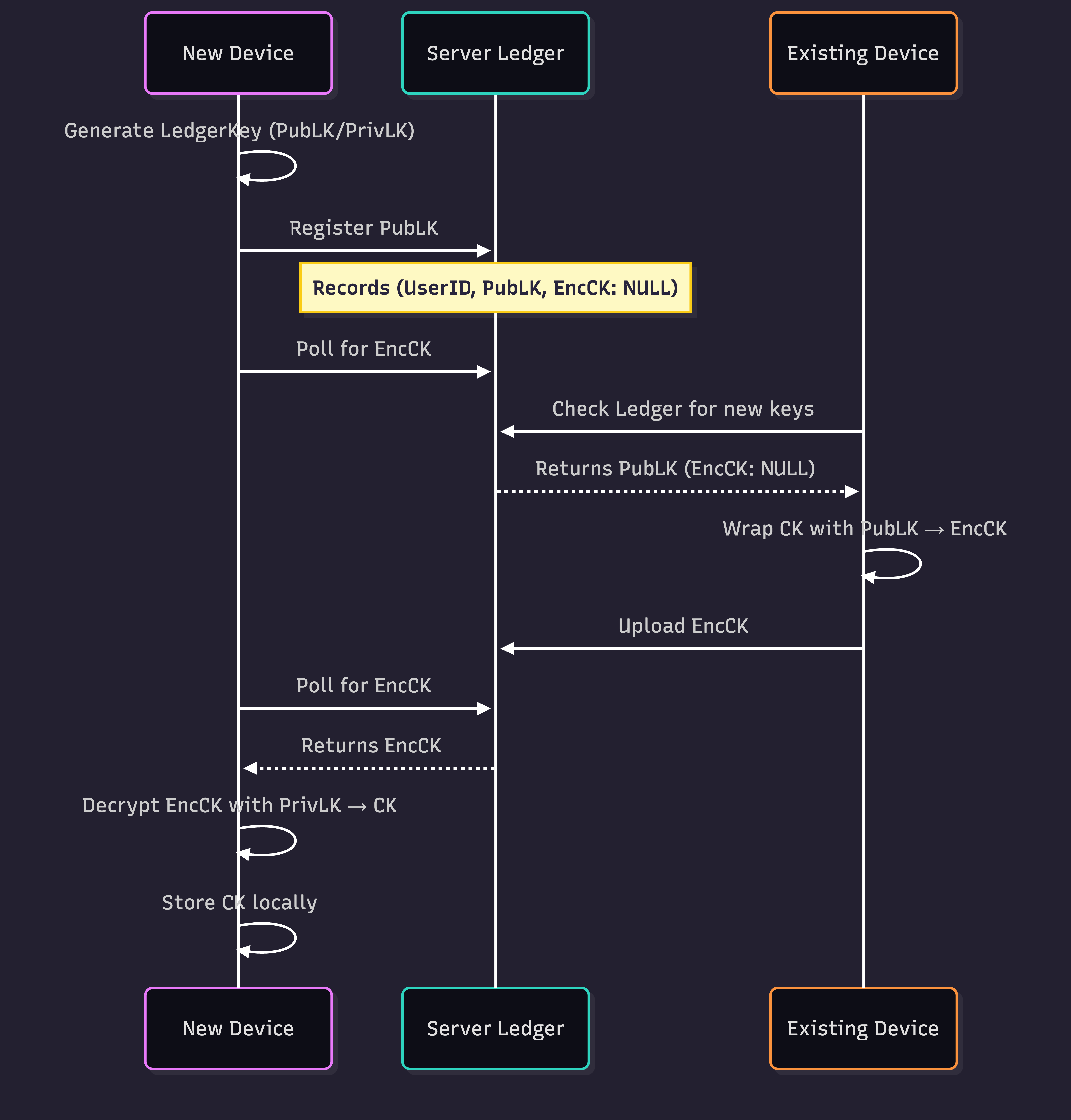
The first time an account is created on a device a ContentKey is created. The goal of synchronization is to get this key to each new device without uploading it directly.
When a new device is used for your account the following sequence happens.
The new device creates a Ledger key that has two parts, a public key that can be shared, and a private key that is kept secret and safe on that device.
The public Ledger key is upload to TopVault.
The new device then waits for a
ContentKeyto be encrypted with its Ledger key. This waiting period is when you see a small notification on your profile photo.
Any existing device must be used to take the next step:
- The new Ledger key is found and used to encrypt a
ContentKey, the resulting encrypted key is stored on TopVault.
Then the new device finishes the sequence:
The encrypted
ContentKeyis downloaded and decrypted with the private portion of the Ledger key.The
ContentKeyis used to encrypt each new uploaded photo.
Only devices with this content key may decrypted the photos. And to be more exact the photos are not encrypted directly, but rather each photo has an associated photo key that is encrypted with the content key and stored along side (in an encrypted form) with the encrypted photo.
Limitations
For ease of use, the keys in the ledger are not wrapped in passwords or PINs. This means that any new device that logs into your account may receive your encrypted photos if its key is synchronized.
There is no way to recover photos if all devices are lost or unable to log back into TopVault. This is by-design to keep photos private. TopVault is not a solution for backing up photos.